NAWL Draw: A Free Pallet Rack Layout Tool That Turns a Floor Plan Into a Parts List
November 19, 2026
Every racking job starts the same way. A customer has a building, a rough idea of how much product they need to store, and a deadline. Somebody has to turn that into a layout, a pallet count and a list of parts before a quote goes out.
For a lot of dealers and installers, that somebody is a person with a pencil, a tape-measure sketch and an evening they didn't plan to spend on it.
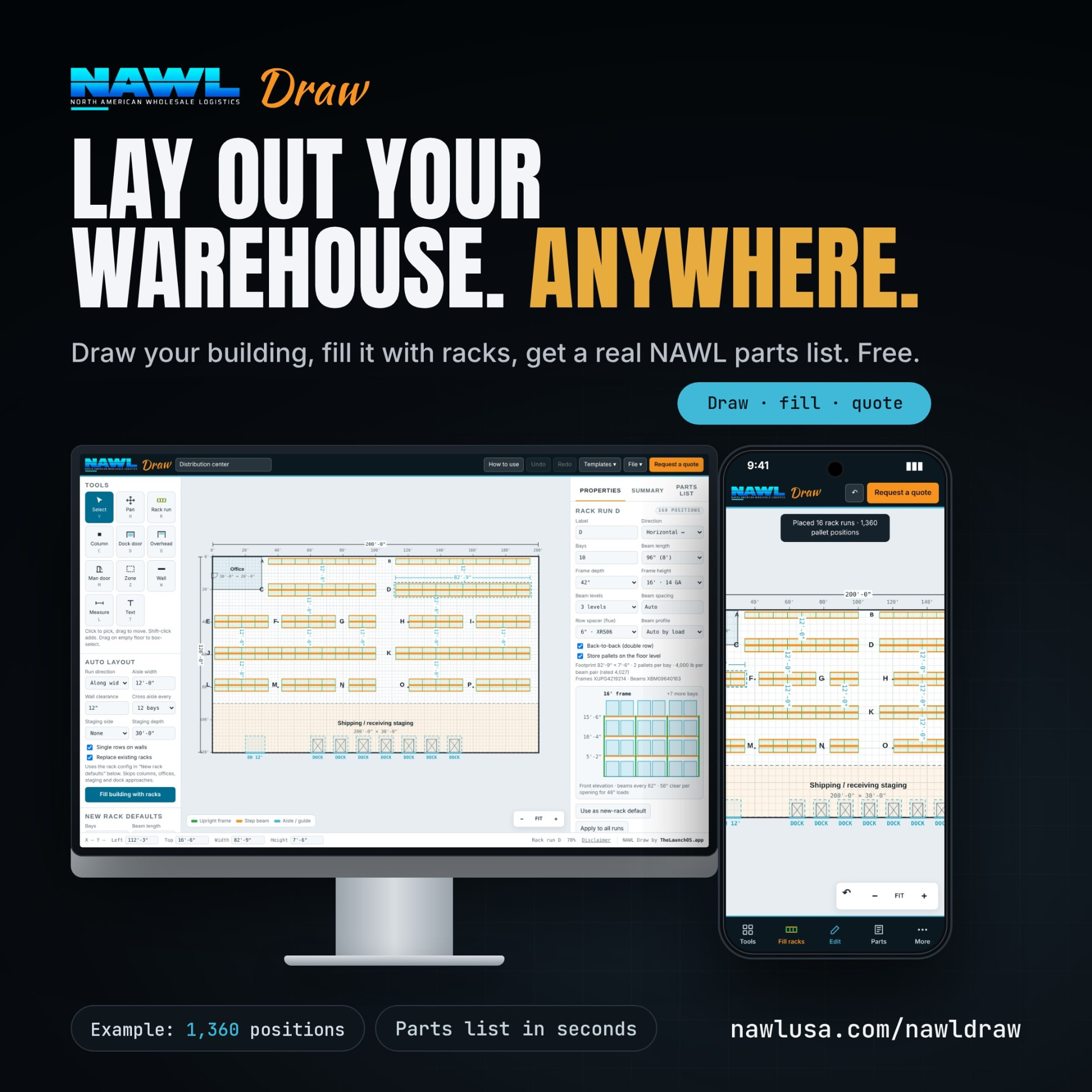
NAWL Draw is built to shorten that step. It is a free, public layout tool on nawlusa.com, with no login required. You draw the building, fill it with rack runs, and it gives you a pallet-position total and a parts list built from real NAWL part numbers.
What NAWL Draw does
You start with the shell of the building. Set the footprint, then place the things that decide where rack can go: dock doors, man doors, columns, offices and other zones, and walls. NAWL Draw works in feet and inches, so what you draw matches what the customer's drawings say.
From there you have two ways to build the layout:
- Fill the building automatically. Pick a run direction, aisle width, wall clearance and how often to add a cross aisle, then tell the tool to fill the building with racks. It skips columns, offices, staging areas and dock approaches. If a customer says “show me what this building holds,” you can start with an automatic layout.
- Place and edit rack runs by hand. Drop a run, then set the bays, beam length, frame depth, frame height and number of beam levels. Turn on back-to-back double rows and floor-level pallet storage where they apply. Each run shows its own position count.
As you work, the tool keeps a running total of pallet positions for the whole layout, so a change to aisle width or beam levels shows up in the count right away. A Summary tab shows the layout as a whole, and a Parts List tab lists what the layout needs, using NAWL part numbers for frames and beams.
It works on a phone as well as a desktop. That matters when you are standing in an empty building with a customer and a tape measure.
When the layout is ready, the customer or the dealer can request a quote straight from the tool. The request goes to the NAWL team, who review it and respond within 24 hours.
Why this matters to dealers
1. Quote faster, with fewer back-and-forths
The slowest part of many quotes is not pricing. It is getting from “we have a 100,000 square foot building” to a layout you trust enough to price. With NAWL Draw, the first draft takes minutes, and the parts list is already tied to NAWL part numbers. Fewer re-drawn sketches and fewer “what did you assume for aisle width?” emails.
2. Show the customer something real in the first meeting
A customer who sees their own building with racks in it, and a pallet count next to it, is having a different conversation than one who is waiting for a PDF next week. Dealers can use the tool live, on a laptop or phone, and change the layout as the customer reacts: wider aisles, one more beam level, a staging area by the docks.
3. Get to a parts list built on parts you can actually buy
A layout from a generic tool still has to be translated into what a supplier stocks. NAWL Draw skips that translation because the parts list uses NAWL part numbers. NAWL ships quick-ship stock within 48–72 hours of an order; heavier columns take 7–10 days. Mill-direct rack is typically quoted at 8–10 weeks. When a customer's move-in date is fixed, that difference is the whole conversation, and having the parts list ready early helps you protect the schedule. Confirm availability and lead times with the team for your order.
4. No minimums on standard items
NAWL has no minimums on standard SKUs, so the same tool and the same supplier work for a 20-bay add-on and for a full building. You don't have to pick a different supplier because the job is small.
5. Wholesale pricing stays between you and NAWL
NAWL Draw produces a layout and a parts list. It is not a price list for end customers. Dealer pricing is available only to approved dealers under a signed dealer agreement, and that relationship does not change. You bring the customer and the project; NAWL supplies the rack.
6. A free tool for you to put in front of your own customers
Because NAWL Draw is free and public, you can send the link to a customer, a general contractor or a tenant rep and let them sketch their own building before they call you. Customers who start with a layout arrive with better questions and a clearer scope.
A realistic example
The supplied NAWL Draw example shows a distribution-center layout on desktop and phone, with a displayed total of 1,360 pallet positions. The dealer can move runs, change an aisle, or add a beam level, watch the count update, and open the parts list.
That number is for the example layout only. Your customer's building, aisle width, beam levels and loads will give a different total. The point is the speed: a first draft in minutes instead of an evening.
What NAWL Draw is not
Being clear about this protects you and your customer.
- It is an estimating and planning tool, not engineering. Layouts and capacity numbers are rough estimates. The customer's engineer needs to confirm them before anything is ordered or installed.
- It does not check fire code, sprinkler clearance or permit requirements. Flue space, ESFR clearance and high-piled storage rules depend on the building and the local fire authority. Ask your fire authority and engineer.
- It does not replace load and slab review. Anchoring, slab thickness and point loads are an engineer's call.
- NAWL does not install racking, stamp drawings or secure permits. NAWL is a wholesale supplier. Installation is handled by the dealer or installer on the job; in the Midwest, NAWL works with an installation partner.
A good habit: treat the output as the first draft that gets the conversation started, then hand it to the people who design, permit and install the job.
How to get started
- Open NAWL Draw.
- Set the building size and place docks, columns and offices.
- Fill the building with racks, or place runs by hand.
- Adjust bays, beam levels, aisles and frame heights until the layout fits the job.
- Check the pallet-position total and open the Parts List tab.
- Request a quote when you are ready. The NAWL team reviews it and responds within 24 hours.
NAWL supplies both pallet rack and cantilever rack; NAWL Draw currently lays out pallet rack.
If you are not yet a NAWL dealer and want to buy at approved dealer pricing, learn about becoming a dealer or call the NAWL team at (817) 504-4230 to ask about a dealer agreement. Online ordering is coming soon.
Better Rack. Better Service. Better Call NAWL.